How To's

Support

How do I request consolidation?

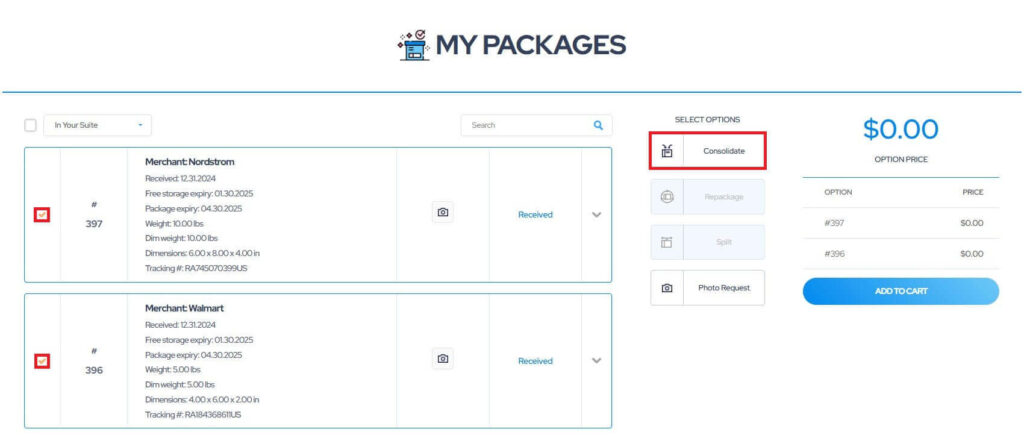
To utilize our parcel consolidation service, please follow these steps:

1. Go to the “My Packages” dashboard.
2. Select two or more packages you wish to have consolidated.
3. Click “Consolidate“.

Please be advised that the consolidation service is only available to packages with the “Received” status.

how to request parcel consolidation service mymallbox 1

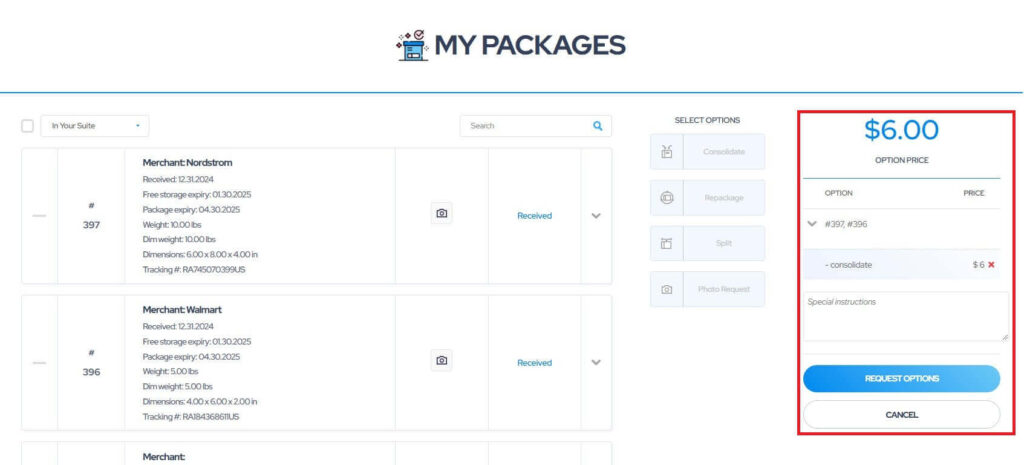
4. If necessary, provide any special instructions or requirements in the designated field.
5. Once you have completed your request, click “Request Options” to submit.

how to request parcel consolidation service mymallbox 2

6. Upon successful submission, the status of your package will be updated to “Requested” and a consolidation icon will appear next to the package to indicate the pending service.

how to request parcel consolidation service mymallbox 3

7. Please note that our team requires up to 24 business hours to process and fulfill your consolidation request. We appreciate your patience during this time.
Latest Posts

Shipping alert

Deliveries to Bahrain, Iran, Iraq, Israel, Jordan, Kuwait, Lebanon, Oman, Qatar, Saudi Arabia, Syria, UAE, and Yemen are temporarily suspended due to ongoing regional conflict. Resume date unknown.

Your Suite Address update

As part of our move to a larger facility, we needed to update how your address needs to appear on your packages being sent to us. Starting immediately, please send all packages to our new address using this format:

2051 Old Coochs Bridge Rd
Suite 500, Rm (your personal suite number)
Newark, DE 19702

Please put our personal suite number in after “Rm” to ensure delivery.